

 |
|
2D Collision
Let's consider collisions in two dimension: Press Start to begin the animation. Two circular objects will move with pre-defined velocity (yellow arrow). Click left mouse button to suspend the animation. Now, you can Click near the tip of the velocity vector and drag the mouse button left/right to change its value (the initial velocity of that object). Click near the circular boundary and drag the mouse button to change its radius. Click near the center of the circle and drag the mouse to change its location. Click the mouse button again to resume the animation. When the two objects collide, the animation will be suspend.
Vf=relative velocity just after collision Vi=relative velocity just before collision for elastic collision eta=1. for perfectly inelastic collision eta=0. You can select different frame of reference to view the relative motion of all the objects. lab is a laboratory inertial frame.
left circular object m1, right circular object m2 and center of mass for m1 and m2. View collision in 1 dimension. At the moment when they collide, the force between the two circle objects is along the line which connect the center of the two objects. 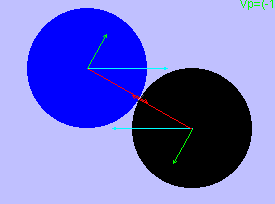 Now we have 1-D collision problem: two object move in the direction along the line connect between their center, with velocitys along this directions. (Red vectors) The vector perpendicular to the above components (green vectors) will not changed after collision. (If there is no friction force between the two objects) Your suggestions are highly appreciated! Please click hwang@phy03.phy.ntnu.edu.tw
Author¡GFu-Kwun Hwang, Dept. of physics, National Taiwan Normal University >Last modified : 
|